The Real Difference Between 4G, 5G, and Wi-Fi 6
If you have bought a phone, router, laptop, or tablet in the past few years, you have probably encountered labels such as 4G, 5G, and Wi-Fi 6. They are usually presented alongside promises of faster downloads, smoother streaming, lower latency, and better connectivity. Because all three technologies allow devices to access the internet wirelessly, it is easy to assume that they are simply different generations of the same thing.
They are not.
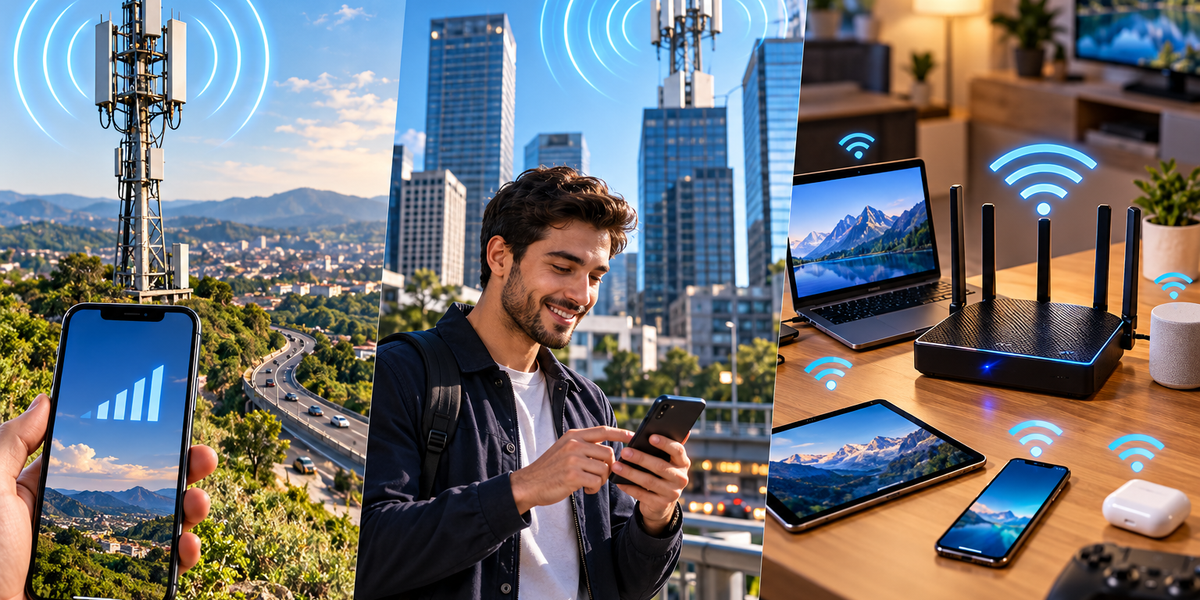
4G and 5G are generations of cellular technology. They connect your phone and other compatible devices to networks operated by mobile carriers, usually through cell towers spread across cities, towns, highways, and rural areas. Wi-Fi 6, on the other hand, is a generation of Wi-Fi technology designed primarily to connect devices to a nearby local network through a wireless router or access point.
The easiest way to understand the difference is to think about where each connection comes from. When your phone uses 5G while you are walking through a city, it is communicating with infrastructure belonging to your mobile provider. When the same phone connects to Wi-Fi 6 at home, it is communicating with your own router or another nearby access point, which then connects to the internet.
The technologies can accomplish similar things, but they are built for very different environments.
What Is 4G?
4G refers to the fourth generation of cellular network technology. It became the foundation of modern mobile internet by delivering a major improvement over earlier 3G networks.
Before widespread 4G, smartphones could access the internet, but many of the experiences we now consider ordinary were slower or less reliable. 4G provided enough capacity and speed to make high-quality video streaming, mobile video calls, app-based transportation, social media video, cloud services, and many other data-heavy applications practical on smartphones.
LTE, or Long-Term Evolution, became the dominant technology associated with 4G networks. You may still see “4G LTE” or simply “LTE” displayed on phones depending on the carrier and location.
One of 4G’s greatest achievements was making mobile internet feel like a normal internet connection rather than a limited version of one. For millions of people, smartphones effectively became their primary computers because cellular networks had become fast enough to support everyday digital life.
What Is 5G?
5G is the fifth generation of cellular network technology and the successor to 4G. It was designed not simply to increase download speeds but to improve several characteristics of mobile networks simultaneously.
Under favorable conditions, 5G can provide significantly higher speeds than 4G. It can also offer lower latency, support greater numbers of connected devices, and provide more network capacity in crowded environments.
However, saying “5G is faster than 4G” oversimplifies the technology. Real-world 5G performance varies enormously depending on the type of 5G being used, available spectrum, network congestion, distance from infrastructure, obstacles, and the mobile provider’s network design.
A phone showing a 5G symbol is therefore not guaranteed to be dramatically faster than a phone using 4G. In some circumstances, a strong 4G connection can perform better than a weak or congested 5G connection.
Not All 5G Is the Same
One reason 5G can be confusing is that it operates across different portions of the radio spectrum.
Lower-frequency 5G signals can travel relatively long distances and penetrate buildings reasonably well, making them useful for providing broad geographic coverage. The tradeoff is that speeds may not be dramatically different from good 4G in some situations.
Mid-band spectrum offers a useful balance between coverage, capacity, and speed, which is why it has become extremely important for many 5G deployments.
At the other extreme is high-frequency millimeter-wave 5G. It can provide extremely high speeds and substantial capacity under the right conditions, but its signals have much shorter range and are more easily blocked by buildings, walls, vegetation, and other obstacles.
This creates one of the fundamental rules of wireless communication: higher performance often comes with tradeoffs in coverage and signal penetration.
What Is Wi-Fi 6?
Wi-Fi 6 is a generation of Wi-Fi based on the IEEE 802.11ax standard. The simpler “Wi-Fi 6” name was introduced partly because technical labels such as 802.11ac and 802.11ax were difficult for ordinary consumers to interpret.
Unlike 4G and 5G, Wi-Fi 6 is not a cellular technology. It is designed for local wireless networking.
When you connect a Wi-Fi 6 phone or laptop to a compatible router, the device communicates with that router using radio signals. The router then connects your local network to the wider internet through whatever internet connection you have, such as fiber, cable, or another broadband service.
This distinction is essential because Wi-Fi itself does not necessarily provide internet access. It provides a wireless network connection. Your router still needs an internet connection if you want devices on that Wi-Fi network to reach the internet.
Why Wi-Fi 6 Was Developed
Wi-Fi networks face a problem that has become increasingly noticeable as homes and offices fill with connected devices.
Years ago, a household might have had one computer connected to Wi-Fi. Today, the same home might contain several phones, laptops, tablets, televisions, speakers, security cameras, game consoles, smart appliances, watches, and other connected devices.
The challenge is therefore no longer simply making one device faster. A modern wireless network needs to manage many devices efficiently at the same time.
Wi-Fi 6 introduced technologies designed to use available wireless capacity more efficiently, particularly in environments with many connected devices. Instead of focusing exclusively on maximum theoretical speed, it improves the way routers and devices coordinate their use of the network.
The result can be better performance in busy homes, offices, apartment buildings, airports, hotels, and other crowded wireless environments.
4G and 5G Travel Much Farther Than Wi-Fi
Perhaps the biggest practical difference between cellular networks and Wi-Fi is coverage.
A Wi-Fi router is designed to provide relatively short-range connectivity within a home, office, café, airport, or similar area. Its signal may travel through several rooms or perhaps farther outdoors, but eventually it becomes too weak to use reliably.
Cellular networks are designed to cover much larger geographic areas. Mobile providers deploy networks of base stations so your phone can move from one coverage area to another while remaining connected.
As you travel, your connection can be handed from one cell to another. That is why you can stream music while driving for hundreds of kilometers without manually connecting to a new network every few minutes.
Wi-Fi does not normally work this way across an entire country. Its strength is local connectivity rather than nationwide mobility.
Which One Is Faster?
There is no single answer because maximum advertised speeds and everyday performance are very different things.
A good 5G connection can be extraordinarily fast, particularly when plenty of spectrum and network capacity are available. Wi-Fi 6 can also provide very high local speeds when paired with capable devices and a fast internet connection.
However, your actual experience depends on the slowest part of the path.
Suppose your Wi-Fi 6 router is capable of extremely high wireless speeds, but your home internet plan provides only 100 Mbps. Your connection to the router may be fast, but your internet downloads will still be limited by the broadband connection.
Similarly, a 5G phone might theoretically support extremely high speeds, but real performance can be limited by signal strength, spectrum availability, network congestion, or the carrier’s infrastructure.
The logo displayed on your screen therefore tells you which technology you are connected to, not exactly how fast your connection will be.
What Does Latency Mean?
Speed is usually described in terms of how much data can be transferred per second, but another measurement called latency can be equally important.
Latency describes how long it takes data to travel between points and receive a response. A connection can have excellent download speed while still feeling sluggish if latency is high.
Imagine downloading a large movie. High bandwidth matters because you need to transfer a lot of information. Now imagine playing a competitive online game. The amount of data may be relatively small, but you need your actions to reach the game server quickly. In that situation, latency becomes extremely important.
5G was designed to enable lower latency than previous cellular generations under appropriate conditions. Wi-Fi 6 also introduced efficiency improvements that can help reduce delays in busy local networks.
Real-world latency, however, depends on much more than the wireless technology itself. The distance to the destination server, network congestion, routing, and the quality of the internet connection all contribute.
Why 5G Can Feel Slow Sometimes
Seeing “5G” at the top of your phone can create an expectation of extraordinary speed, but several factors can produce disappointing performance.
Your phone might be connected to a lower-frequency 5G network designed primarily for coverage rather than maximum speed. You might be near the edge of a cell’s coverage area. Thousands of other people might be sharing the available network capacity. Buildings and other obstacles can weaken signals, while the network beyond the radio connection may itself be congested.
Mobile networks are shared systems. A cell tower does not provide every connected person with unlimited dedicated bandwidth. Available capacity has to be managed among users.
This is why a speed test performed at 3 a.m. can sometimes produce dramatically different results from one performed in the same location during a crowded event.
Why Your Wi-Fi Can Be Slow Even With Fast Internet
Wi-Fi has similar bottlenecks.
You might pay for a very fast fiber connection but experience slow internet in an upstairs bedroom because the router’s signal has to travel through several walls. Nearby networks can create interference, particularly in densely populated apartment buildings. An old device or poorly positioned router can also affect performance.
The location of the router matters more than many people realize. Hiding it inside a cabinet, placing it behind large objects, or putting it at one end of a large home can create weak coverage elsewhere.
Wi-Fi 6 improves network efficiency, but it cannot eliminate the basic laws of physics. Radio signals still weaken with distance and encounter difficulties passing through certain materials.
Wi-Fi 6 Does Not Automatically Make Your Internet Faster
This is one of the biggest misconceptions surrounding new Wi-Fi standards.
Buying a Wi-Fi 6 router does not automatically increase the speed of the internet connection entering your home. If your internet provider delivers 100 Mbps, replacing your router with one capable of much higher wireless speeds will not magically transform that broadband connection into a gigabit service.
What the new router can improve is the network inside your home. It may handle multiple devices more efficiently, provide better wireless performance, reduce congestion, or allow compatible devices to communicate with the router at higher speeds.
To benefit fully, both sides of the connection also need to support the relevant technology. A Wi-Fi 6 router can work with many older Wi-Fi devices, but those older devices cannot suddenly acquire all the capabilities of Wi-Fi 6.
5G Can Replace Home Internet in Some Situations
Traditionally, cellular networks connected phones while fixed broadband connections supplied homes. 5G has made that distinction less rigid.
Some providers offer fixed wireless access, where a home receives internet connectivity through a 5G cellular network rather than a physical fiber or cable line. A modem or gateway receives the cellular signal and then creates a local Wi-Fi network for devices inside the home.
For households with strong 5G coverage, this can provide competitive speeds without requiring a traditional wired connection.
However, performance can vary more than with some wired connections because cellular conditions change. Signal quality, weather in certain frequency ranges, network congestion, building materials, and local coverage can influence performance.
5G can therefore function as both a mobile technology and, increasingly, an alternative way of delivering home broadband.
Can You Use 5G and Wi-Fi 6 at the Same Time?
These technologies are not competitors in the sense that you must permanently choose one. Your phone probably uses both throughout the day.
At home, it may connect to Wi-Fi because your router provides a strong local connection and your broadband plan may offer plenty of data. When you leave the house, the phone disconnects from Wi-Fi and switches to 4G or 5G.
In some modern networking situations, devices and applications can even make sophisticated decisions about which available connection provides the best performance.
The technologies complement each other. Cellular networks provide broad mobility, while Wi-Fi provides efficient local connectivity.
What About Security?
Both cellular and Wi-Fi technologies include security mechanisms, but the way people interact with them differs.
Your cellular connection is authenticated through systems associated with your mobile subscription and SIM or eSIM. You generally do not enter a password every time your phone connects to another cellular base station.
Wi-Fi networks usually require authentication at the local network level. At home, this commonly means entering a Wi-Fi password. Modern Wi-Fi security standards such as WPA3 provide stronger protections when supported and properly configured.
Public Wi-Fi requires additional caution because you do not control the network itself. HTTPS and other forms of encryption protect much of modern internet traffic, but users should still be careful about connecting to suspicious or impersonated wireless networks.
Does 5G Use More Battery?
The relationship between network generation and battery consumption is complicated.
A phone communicating with a weak cellular signal may use additional power as it works to maintain the connection. Early implementations of newer cellular technologies can also be less power-efficient because devices may need to manage multiple network technologies simultaneously.
As hardware and networks mature, efficiency usually improves. The amount of battery consumed depends on the phone, modem, signal conditions, network configuration, and what the device is actually doing.
Wi-Fi often uses less power than cellular communication in ordinary indoor situations because the access point is nearby, although this is not an absolute rule.
The simple assumption that 5G always destroys battery life is therefore misleading. Signal quality and usage patterns matter enormously.
Which Connection Should You Use?
For most people, the decision does not need to be complicated.
A reliable home or office Wi-Fi connection is usually the natural choice when you are within range. It can provide excellent speed, avoid consuming mobile data allowances, and efficiently connect many devices to the same broadband connection.
5G is particularly valuable when you are away from Wi-Fi and need fast mobile connectivity. It is also increasingly useful as a home broadband option in areas where fixed connections are slow, expensive, or unavailable.
4G remains extremely useful because its coverage is mature and widespread. Even as 5G expands, phones can continue using 4G in locations where it provides the stronger or more practical connection.
Your device will often make much of this decision automatically.
4G Is Not Suddenly Obsolete
The arrival of 5G did not instantly make 4G useless.
Mobile network generations overlap for many years. Providers gradually deploy new infrastructure while maintaining older networks for coverage, compatibility, and capacity.
A strong 4G LTE connection remains perfectly capable of supporting most everyday smartphone activities, including web browsing, music streaming, video calls, social media, navigation, and high-quality video.
For ordinary users, the difference between excellent 4G and average 5G may sometimes be difficult to notice outside large downloads or particularly demanding applications.
The move to 5G is therefore an evolution of mobile infrastructure rather than a moment when 4G suddenly stopped working well.
The Names Matter Less Than the Connection You Actually Get
4G, 5G, and Wi-Fi 6 describe important technological generations, but they should not be treated as guarantees of performance.
4G provides mature, widespread mobile broadband. 5G expands cellular networks with greater potential speed, capacity, and lower latency. Wi-Fi 6 improves local wireless networking, particularly when many devices need to share the same network efficiently.
The biggest difference is where they operate. 4G and 5G connect you through mobile carrier infrastructure across large geographic areas. Wi-Fi 6 connects you to a nearby router or access point, which then provides access to a local network and usually the internet.
In everyday life, you will probably continue moving between all of them without thinking much about it. Your phone might use Wi-Fi 6 while you drink coffee at home, switch to 5G when you walk outside, and fall back to 4G while traveling through an area with weaker 5G coverage.
The best network is not necessarily the one with the newest number beside its name. It is the one that gives you a fast, stable, secure connection where you actually need it.